Data Plane Design
Date: 2026-03-12 Status: Approved (v2)
Problem
The original three-plane model (user / control / management) governs control flow cleanly but does not govern data flow. As agentic workloads grow, a structural gap emerges: the lakehouse is used simultaneously as:
- Storage for user-plane outputs (perception data, job results, telemetry)
- Memory substrate for control-plane agents (job history, cluster failure patterns)
- Training corpus for model fine-tuning (VLA, classification models)
- Observability archive (agent traces, experiment results)
No single plane owns this. The control plane's LakehouseAgent reaches into it; the user
plane writes to it; the management plane governs access to it. The lakehouse is not a
single-plane component — it spans planes, and needs its own architectural treatment.
The deeper issue: in agentic systems, the data flow direction is reversed relative to traditional software.
Traditional:  logic  →  data
Agentic:      data   →  reasoning  →  action
Data becomes the substrate of cognition. The lakehouse is not analytics infrastructure — it is the persistent world model of the system. It needs a dedicated plane.
Definition
The data plane governs: movement, storage, transformation, and accessibility of data across the entire system. It is orthogonal to reasoning (control plane) or execution (user plane).
The data plane sits horizontally — all other planes interact with it:
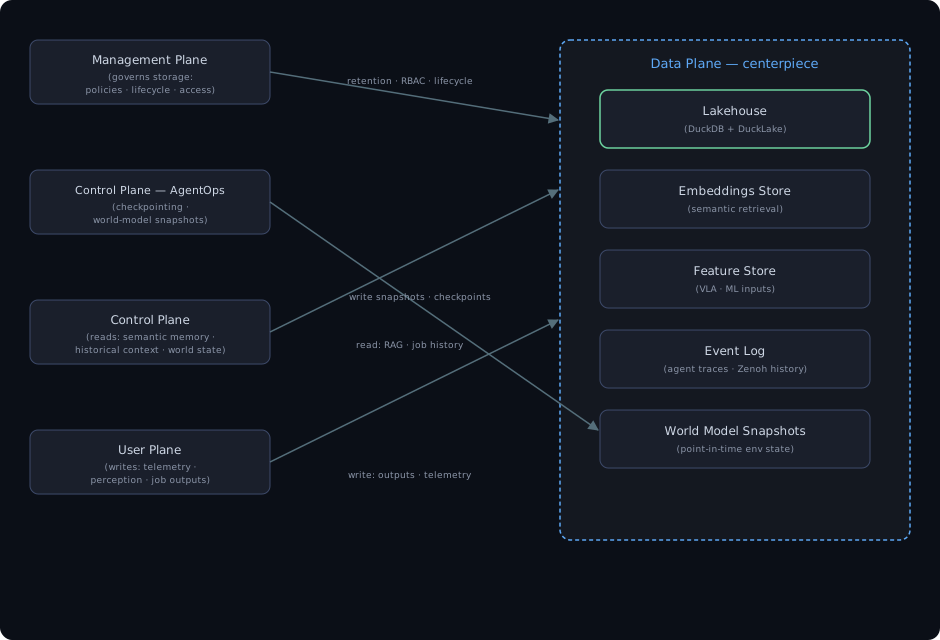
Editable Mermaid source: images/design-data-plane-horizontal.mermaid.md
Goals
- Provide a unified persistent storage substrate for all planes
- Formalise the
LakehouseAgentas the control-plane API boundary to the data plane - Define ingestion pipelines from the user plane (structured, versioned, lineaged)
- Enable semantic retrieval for control-plane agents (RAG over job history and agent traces)
- Support world-model snapshots for AgentOps checkpointing and causal replay
- Serve as training data substrate for VLA and ML model fine-tuning (v3)
Non-goals
- Real-time message passing — that is Zenoh / NATS / DDS (transport, not storage)
- Governance policy definition — that is the management plane
- Agent reasoning or query planning — that is the control plane
- Job execution — that is the user plane
Architecture
Storage layers
| Layer | Technology | Contents | Access pattern |
|---|---|---|---|
| Lakehouse | DuckDB + DuckLake (PostgreSQL catalog) over S3 object storage | Structured outputs, experiment results, job history | SQL (DuckDB in-process), Parquet partitions in object storage |
| Object store | RustFS (local, on TrueNAS ZFS) + Cloudflare R2 (cloud, exposure-only) | Raw files: fMP4 chunks, GeoParquet, point clouds, model checkpoints | Blob read/write via s3fs |
| Embeddings store | pgvector / Chroma (v2) | Dense vectors for semantic retrieval (agent traces, docs) | ANN search |
| Feature store | Feast / custom Parquet (v3) | Structured ML features for VLA and classification models | Batch + online |
| Event log | Append-only Parquet partitions in the landing/ bucket | Agent traces, Zenoh event recordings, ROS bag metadata | Append write, batch read |
| World model snapshots | DuckLake snapshots (v2) | Point-in-time environment state for AgentOps | Write on checkpoint, read on replay |
The object-storage layer is a two-tier S3 design: RustFS on TrueNAS ZFS as the local authoritative store (migrated in place from MinIO), and Cloudflare R2 for the exposure tier only (buckets that must reach Cloudflare/website infrastructure). See the MinIO → RustFS migration runbook for the rationale and the TrueNAS SCALE migration steps.
Dataset & checkpoint versioning (R2 + W&B artifacts)
R2 has no native bucket versioning — the S3 PutBucketVersioning operation is unimplemented
and the Cloudflare Terraform provider exposes no versioning resource. Binary artifact folders that
do not live in DuckLake as Parquet — robot episode datasets (LeRobot / Rerun recordings)
and model checkpoints — get reproducible versioning from two mechanisms that compose:
- Immutable
vN/prefixes. Each revision is written under a freshvN/prefix and is never overwritten, e.g.s3://ar4-physical-ai/datasets/ar4-pick-place/v3/. This preserves the bytes. - W&B reference artifacts. Each
vN/folder is logged as a W&B artifact viaArtifact.add_reference("s3://…/vN/"). W&B records a manifest (object key + ETag + size) and layers a version graph, alatestalias, and run lineage on top of the immutable bytes.
add_reference stores a manifest, not the bytes, so a referenced version only stays reproducible
if its objects never change. The immutable vN/ rule guarantees that — which is why the helper
refuses to write into an existing version (it raises rather than overwrite).
Bucket layout:
s3://ar4-physical-ai/
  datasets/<name>/vN/…       # episode datasets
  checkpoints/<name>/vN/…    # model checkpoints
Helper — data-plane/lakehouse/versioning.py:
from lakehouse.versioning import version_dataset, version_checkpoint, list_versions

res = version_dataset("/data/ar4/pick_place/run", "ar4-pick-place",
                      metadata={"episodes": 120, "sim": "gazebo"})
res.version_tag      # "v3"  — next free version, auto-allocated (never overwrites v1/v2)
res.s3_uri           # "s3://ar4-physical-ai/datasets/ar4-pick-place/v3/"
res.wandb_artifact   # "ar4-pick-place:v3"  (W&B aliases: v3, latest)

version_checkpoint("/ckpt/act_step_50k", "ar4-act-policy")
list_versions("ar4-pick-place", "dataset")   # [1, 2, 3]
Credentials reuse the data plane's R2_ENDPOINT / R2_ACCESS_KEY / R2_SECRET_KEY (mirrored into
the AWS_* env vars so W&B's S3 reference crawl reaches R2) plus WANDB_API_KEY. Pass
log_wandb=False to upload to R2 only.
This is complementary to DuckLake time-travel (see the "Time Travel" use case): DuckLake versions
structured Parquet tables in the catalog; the vN/ + W&B scheme versions opaque blob folders
(episodes, checkpoints) that are not catalog tables. Both let you pin training to an exact input
version — choose by data shape.
DuckDB + DuckLake as the query and catalog layer
DuckDB is the in-process analytical query engine. DuckLake is the transactional catalog:
ATTACH 'ducklake:postgresql://...' exposes tables whose metadata lives in PostgreSQL and
whose data lives in the lakehouse as Parquet fragments. The full DuckLake schema (174 catalog tables)
is in data-plane/tests/ducklake-schema.sql.
Key catalog tables:
experiments— experiment registry (id, project, description, created_at)simulation_runs— per-simulator run records with S3 prefix, status, configducklake_table,ducklake_data_file— DuckLake's own catalog metadata
The LakehouseAgent (Bash(duckdb *), Bash(python *), Read, Edit) is the control plane's
operator interface: it runs DuckDB queries, inspects the catalog, and calls
python -m lakehouse commands. It is not a transformation pipeline — it is a catalog
operator and query runner.
Data flow
User plane → data plane (ingestion)
User-plane workers (Ray jobs on torch.dev.gpu and ros.dev.gpu) write outputs to the
data plane on job completion:
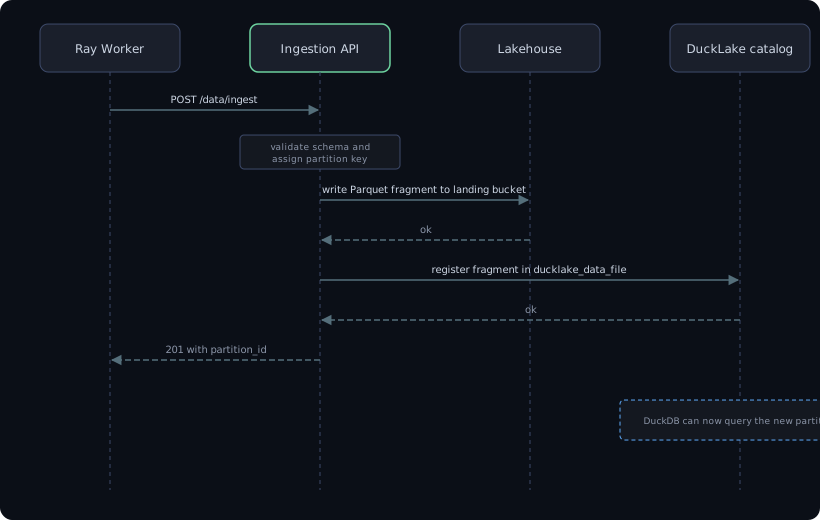
Editable Mermaid source: images/design-ingestion-sequence.mermaid.md
In v1, ingestion is manual (Ray worker writes output files; LakehouseAgent registers them
via DuckDB). In v1.5, the ingestion API is a lightweight FastAPI endpoint in
data-plane/lakehouse/ called directly by Ray workers on job completion.
Control plane → data plane (reads)
Control-plane agents read from the data plane in two modes:
- Structured query (current):
LakehouseAgentruns DuckDB queries over DuckLake and reads Parquet files via DuckDB in the agent subprocess - Semantic retrieval (v2): control-plane agents call an embeddings query endpoint to retrieve relevant agent traces, job history, or world-model state as context
# v1: LakehouseAgent reads directly
"Run SELECT * FROM job_outcomes ORDER BY completed_at DESC LIMIT 10 WHERE status = 'failed'"

# v2: semantic retrieval endpoint
GET /data/retrieve?query="notebook jobs that failed on torch.dev.gpu last week"&top_k=5
→ [{job_id, summary, outcome, wandb_run_id}]
AgentOps → data plane (snapshots)
The control plane's AgentOps subsystem writes world-model snapshots to the data plane on checkpoint events and at the end of each agent invocation. These snapshots are the foundation for causal replay and VLA training data.
WorldModelSnapshot {
  snapshot_id:     UUID
  intent_id:       UUID
  timestamp:       ISO 8601
  agents_active:   [{role, status, tool_call_count}]
  user_plane:      {torch: {jobs_in_flight, gpu_util}, ros: {jobs_in_flight, gpu_util}}
  causal_chain:    [{intent_id, job_id, outcome}]
}
The lakehouse as persistent world model
In agentic robotics systems, the lakehouse accumulates not just analytics data but the episodic and semantic memory of the entire system:
| Memory type | Contents | Enables |
|---|---|---|
| Episodic | Job history, cluster failure events, navigation trial outcomes | Agent reasoning over "what happened before" |
| Semantic | Learned cluster failure patterns, experiment regression signatures | Agent pattern matching without re-executing |
| Procedural | Successful job submission sequences, DuckLake catalog dependency chains | Agent skill recall |
| Perceptual | GeoParquet outputs, YOLOv8 detections, SLAM maps | VLA fine-tuning, world-model grounding |
For the turtlebot-maze reference application:
- Every Nav2 navigation trial → appended to
event_log.ros_navigation_trials - Every YOLOv8 detection → appended to
event_log.object_detections - Every world-model snapshot at decision point → stored in
world_model.snapshots - Aggregate: accumulated robot experience becomes a fine-tuning corpus for VLA models
This is the convergence point between the data plane and world-model-based VLA research: the lakehouse is the persistent world model.
Interfaces
Ingestion API (data plane ← user plane)
POST /data/ingest
Body: {table: str, records: list[dict], schema_version: str, job_id: UUID, tenant_id: UUID}
→ 201 {partition_id, row_count}

POST /data/snapshots
Body: WorldModelSnapshot
→ 201 {snapshot_id}
Query API (data plane → control plane)
GET /data/query?sql=<duckdb_sql>&tenant_id=<uuid>
→ {columns: [...], rows: [...]}

GET /data/retrieve?query=<natural_language>&top_k=<n>&tenant_id=<uuid>   (v2)
→ [{id, text, score, metadata}]
Policy interface (management plane → data plane)
PUT /data/policy
Body: {tenant_id, retention_days, allowed_tables: [...], max_storage_gb: float}
→ 200
Critical distinction: data plane vs management plane
A common mistake is placing the lakehouse under the management plane. They are separate:
| Data Plane | Management Plane |
|---|---|
| Stores and transforms data | Governs how data is stored |
| Serves queries | Defines query access policies |
| Manages schemas and lineage | Manages access rights and retention |
| Enables agent reasoning | Enforces compliance |
The management plane governs the data plane. It does not own it.
Evolution path
v1   — Data plane in data-plane/; LakehouseAgent as catalog operator; manual ingestion
v1.5 — Formalise ingestion API; structured AgentEvent log
v2   — Embeddings store + RAG retrieval endpoint for control-plane agents
       World-model snapshots (AgentOps → data plane)
       Schema lineage visible in management-plane dashboard
v3   — VLA training pipeline: accumulated perception data → fine-tuning loop
       Feature store for online inference (real-time VLA feature serving)
       Data plane exposes MCP server: agents query job history and world state via tool calls
Requirements (DP-xxx)
Traces to system-level requirements in architecture/four-plane.md.
| ID | Requirement | Traces to | Version |
|---|---|---|---|
| DP-001 | The data plane shall govern movement, storage, transformation, and accessibility of data across the system | SYS-001 | v1 |
| DP-002 | The data plane shall sit horizontally, serving all other planes | SYS-007 | v1 |
| DP-003 | The data plane shall have latency of seconds, eventually consistent | SYS-001 | v1 |
| DP-004 | Data plane failure shall cause query failures and queued ingestion; agents lose context | SYS-002 | v1 |
| DP-006 | The data plane shall provide a unified persistent storage substrate for all planes | SYS-007 | v1 |
| DP-007 | LakehouseAgent shall be the control-plane API boundary to the data plane | CP-010 | v1 |
| DP-008 | The data plane shall define structured, versioned, lineaged ingestion pipelines from user plane | — | v1 |
| DP-009 | The data plane shall enable semantic retrieval for control-plane agents (RAG over job history) | — | v2 |
| DP-010 | The data plane shall support world-model snapshots for AgentOps checkpointing and causal replay | CP-030 | v2 |
| DP-011 | The data plane shall serve as training data substrate for VLA fine-tuning | — | v3 |
| DP-012 | The data plane shall use DuckDB + DuckLake (PostgreSQL catalog) over S3 object storage | SYS-007 | v1 |
| DP-013 | Structured outputs and experiment results shall be stored as Parquet in the lakehouse via DuckLake | DP-012 | v1 |
| DP-014 | Raw files (fMP4, GeoParquet, point clouds, checkpoints) shall be stored in object store | DP-012 | v1 |
| DP-015 | Embeddings store (pgvector/Chroma) shall support dense vectors and semantic retrieval | DP-009 | v2 |
| DP-016 | Feature store shall support structured ML features for VLA and classification | DP-011 | v3 |
| DP-017 | Event log shall be append-only Parquet in the landing/ bucket for agent traces and ROS bag metadata | — | v1 |
| DP-018 | World model snapshots shall capture point-in-time environment state | DP-010 | v2 |
| DP-019 | DuckLake transactional catalog shall use PostgreSQL metadata and Parquet data in object storage | DP-012 | v1 |
| DP-020 | DuckLake schema shall include experiments, simulation_runs, ducklake_table, ducklake_data_file | DP-019 | v1 |
| DP-021 | LakehouseAgent allowedTools: Bash(duckdb *),Bash(python *),Read,Edit | CP-010 | v1 |
| DP-022 | The data plane shall not be a transformation pipeline; LakehouseAgent is a catalog operator | — | v1 |
| DP-023 | Ingestion API: POST /data/ingest → 201 {partition_id, row_count} | — | v1.5 |
| DP-024 | Snapshot API: POST /data/snapshots with WorldModelSnapshot → 201 {snapshot_id} | DP-010 | v2 |
| DP-025 | Query API: GET /data/query?sql=<duckdb_sql> → {columns, rows} | — | v1 |
| DP-026 | Semantic retrieval API: GET /data/retrieve?query=<text>&top_k=<n> → [{id, text, score}] | DP-009 | v2 |
| DP-027 | Policy interface: PUT /data/policy with retention/RBAC config → 200 | MP-004 | v2 |
| DP-028 | The data plane shall NOT be the message passing substrate (that is Zenoh/NATS/DDS) | — | v1 |
| DP-029 | The data plane shall NOT define governance policy (that is the management plane) | — | v1 |
| DP-030 | User plane Ray workers shall write outputs to the landing/ bucket; DuckLake registers fragments | — | v1 |
| DP-031 | v1 ingestion: Ray worker writes files; LakehouseAgent registers via DuckDB | — | v1 |
| DP-032 | v1.5 ingestion: lightweight API endpoint callable directly by Ray workers | DP-023 | v1.5 |
| DP-033 | v1 reads: LakehouseAgent runs DuckDB queries | — | v1 |
| DP-034 | v2 reads: semantic retrieval via embeddings query endpoint | DP-026 | v2 |
| DP-035 | The data plane shall accumulate episodic memory (job history, cluster failures, navigation trials) | — | v1 |
| DP-036 | The data plane shall accumulate semantic memory (failure patterns, regression signatures) | — | v2 |
| DP-037 | The data plane shall accumulate procedural memory (successful job sequences, dependency chains) | — | v2 |
| DP-038 | The data plane shall accumulate perceptual memory (GeoParquet, YOLOv8 detections, SLAM maps) | — | v1 |
| DP-039 | turtlebot-maze: Nav2 navigation trials stored in event_log.ros_navigation_trials | SYS-003 | v1 |
| DP-040 | turtlebot-maze: YOLOv8 detections stored in event_log.object_detections | SYS-003 | v1 |
| DP-041 | turtlebot-maze: world-model snapshots at decision points in world_model.snapshots | SYS-003, DP-010 | v2 |
| DP-042 | The data plane shall be separate from the management plane | SYS-001 | v1 |
See also:
docs/control-plane/design.mdx§"AgentOps Subsystem" — world-model snapshots, checkpointing, LakehouseAgent, agent memorydocs/management-plane/design.md— retention policy, RBACdocs/user-plane/design.md— ingestion producers (Ray workers)docs/data-plane/coco-demo-design.mdx— Experiment #0: multimodal dataset store design (HF datasets, Zenoh v2, W&B adapter, Rerun routing)docs/data-plane/coco-demo-plan.mdx— Experiment #0 implementation plan fordata-plane/lakehouse/
Example Use Cases of the Auraison Lakehouse
The following examples use the SQuAD validation dataset (stored in s3://landing/squad/) to illustrate the concrete benefits of the DuckLake lakehouse over a plain object store or traditional database.
1. Schema Evolution — add columns without rewriting parquet files
After a model inference run, new columns can be appended to an existing table with no data rewrite:
ALTER TABLE squad ADD COLUMN model_answer VARCHAR;
ALTER TABLE squad ADD COLUMN confidence FLOAT;

-- Backfill from an inference run
UPDATE squad SET model_answer = 'Denver Broncos', confidence = 0.97
WHERE id = '56be4db0acb8001400a502ec';
DuckLake records the schema change in the PostgreSQL catalog; the underlying Parquet files in the lakehouse are untouched. Without a lakehouse this requires a full dataset rewrite.
2. Time Travel — pin to the exact snapshot used for training
Every write creates a new catalog snapshot. Queries can be issued against any prior version:
-- Inspect data before model answers were added
SELECT * FROM squad AT (VERSION => 1) LIMIT 5;

-- Diff two snapshots: which answers changed?
SELECT curr.id, curr.model_answer, prev.model_answer AS old_answer
FROM squad AT (VERSION => 3) curr
JOIN squad AT (VERSION => 1) prev USING (id)
WHERE curr.model_answer IS DISTINCT FROM prev.model_answer;
This makes ML experiments reproducible: a training run can be tied to a specific catalog version and replayed exactly.
3. Cross-plane Join — catalog metadata + raw data in a single query
simulation_runs (DuckLake catalog) and squad (raw parquet in the lakehouse) can be joined without ETL:
SELECT
    r.config->>'model'                                                   AS model,
    COUNT(*) FILTER (WHERE s.model_answer = s.answers.text[1])          AS exact_match,
    COUNT(*)                                                             AS total,
    ROUND(100.0 *
        COUNT(*) FILTER (WHERE s.model_answer = s.answers.text[1])
        / COUNT(*), 2)                                                   AS em_pct
FROM squad s
JOIN simulation_runs r ON r.s3_prefix = s.title
GROUP BY 1
ORDER BY em_pct DESC;
Without the lakehouse this requires a separate MLflow or W&B lookup followed by a manual join.
4. Predicate Pushdown — skip irrelevant row groups
DuckDB pushes WHERE predicates into the Parquet reader, scanning only matching row groups:
-- Only reads the row groups where title = 'Super_Bowl_50'
SELECT id, question, answers.text[1] AS answer
FROM read_parquet('s3://landing/squad/**/*.parquet')
WHERE title = 'Super_Bowl_50';

-- Inspect the query plan
EXPLAIN SELECT * FROM squad WHERE title = 'Beyoncé';
On a large dataset (e.g. full COCO-Caption at ~100 GB) this reduces scan time from minutes to seconds.
5. Incremental Ingest — idempotent append with no duplicates
New parquet drops in landing/ can be merged into the warehouse without risk of duplicates:
INSERT INTO squad
SELECT s.*
FROM read_parquet('s3://landing/squad/**/*.parquet') s
LEFT JOIN squad w ON s.id = w.id
WHERE w.id IS NULL;
DuckLake's MVCC guarantees that concurrent readers see a consistent snapshot even while the insert is in flight.
6. Analytical Queries — OLAP directly on lakehouse data
No separate analytics database is needed; DuckDB runs columnar OLAP over the same Parquet files used for training:
-- Answer length distribution by article
SELECT
    title,
    COUNT(*)                          AS num_questions,
    AVG(LENGTH(answers.text[1]))      AS avg_answer_len,
    MAX(LENGTH(context))              AS max_context_len
FROM squad
GROUP BY title
ORDER BY num_questions DESC;

-- Questions with multiple valid answers (annotator disagreement)
SELECT id, question, len(answers.text) AS num_answers
FROM squad
WHERE len(answers.text) > 1
ORDER BY num_answers DESC
LIMIT 10;
Summary
| Pattern | Lakehouse benefit | Without lakehouse |
|---|---|---|
| Schema evolution | Zero-copy column add | Full dataset rewrite |
| Time travel | Snapshot pinning for reproducibility | Manual versioned file copies |
| Cross-plane join | Catalog + data in one query | Separate MLflow/W&B lookup |
| Predicate pushdown | Row-group pruning, sub-second scans | Full table scan |
| Incremental ingest | Idempotent MVCC appends | App-level dedup logic |
| Analytical queries | In-place OLAP over training data | Export to separate analytics DB |
External Infrastructure (TrueNAS Lab)
The data-plane can run against existing lab infrastructure instead of the bundled Docker services. The lab exposes two services:
Both live on truenas-scale, tailnet address 100.118.64.53. Address them by that
tailnet IP rather than by a LAN IP: it is the same on-LAN and off-LAN, and it does not
move when a DHCP lease changes, which is what stranded the older 192.168.1.x values
recorded here.
| Service | Address | Notes |
|---|---|---|
| S3 (TrueNAS) | https://s3.aegeanai.com/ | Cloudflare Tunnel — valid TLS, no Tailscale needed |
| S3 (tailnet) | http://100.118.64.53:9000 | Faster; no Cloudflare hop; requires Tailscale |
| PostgreSQL | 100.118.64.53:5432 | Tailscale required |
Networking matrix
| Context | S3 endpoint | PG host | Tailscale needed? |
|---|---|---|---|
| Docker (default) | http://rustfs:9000 | postgresql:55432 | No |
| Lab, on-LAN or remote | http://100.118.64.53:9000 | 100.118.64.53:5432 | Yes |
| No Tailscale available | https://s3.aegeanai.com/ | unreachable | No (S3 only) |
Cloudflare Tunnel caveat
The public https://s3.aegeanai.com/ endpoint does not support chunked/multipart uploads.
boto3 falls back to multipart for objects larger than ~8 MB by default.
Set a high threshold or disable multipart for bulk Parquet ingestion through the tunnel:
from boto3.s3.transfer import TransferConfig
config = TransferConfig(multipart_threshold=10 * 1024 ** 3)  # effectively disables multipart
s3.upload_fileobj(f, bucket, key, Config=config)
Recommendation: use the tailnet path for bulk ingestion; reserve the Cloudflare tunnel for small files and for machines that are not on the tailnet.
Setup — TrueNAS S3
- In TrueNAS → Credentials → S3 API Keys: create a key with read/write on
warehouse,iceberg,landing. - Pre-create the three buckets (or run
mc-jobpointed at the TrueNAS endpoint). - Set in
.env:
MINIO_ENDPOINT=https://s3.aegeanai.com   # or http://100.118.64.53:9000 over the tailnet
MINIO_ACCESS_KEY=<truenas-key-id>
MINIO_SECRET_KEY=<truenas-secret>
MINIO_USE_SSL=true                        # false for the tailnet endpoint
Setup — TrueNAS PostgreSQL
- On the TrueNAS PostgreSQL instance:
CREATE ROLE ducklake LOGIN PASSWORD '<choose-a-password>';
CREATE DATABASE ducklake OWNER ducklake;- Ensure the TrueNAS firewall allows TCP 5432 from your dev host / container subnet.
- Set in
.env:
DUCKLAKE_POSTGRES_DSN=postgresql://ducklake:<password>@100.118.64.53:5432/ducklakeStarting containers against external infra
# Start only the dev container (skip rustfs / postgresql / bucket-init):
cd data-plane
docker compose up -d lakehouse.dev.cpu

# The container inherits MINIO_ENDPOINT and DUCKLAKE_POSTGRES_DSN from .env
# and falls back to Docker service names if the vars are not set.
# Start with local Docker infra (original behaviour):
docker compose --profile local-infra up -d