Data-Plane Schema Reference
Full schema reference for the Auraison data plane: DuckLake system tables (versioning, catalog, storage, partitioning, statistics) and Auraison custom tables (experiments, simulation_runs, user data).
The Auraison data plane stores all metadata in a single PostgreSQL database attached via the DuckLake extension. Tables fall into two groups:
- DuckLake system tables (
ducklake_*) — 17 tables created automatically by the extension; they implement MVCC versioning, the table/column catalog, Parquet file tracking, partitioning, and column statistics. - Auraison custom tables — defined by
LakehouseCatalog._init_schema()(experiments,simulation_runs) and by user notebooks or scripts (e.g.coco_caption).
Architecture Overview
The diagram below groups all tables by subsystem and shows how they connect to the lakehouse object storage.
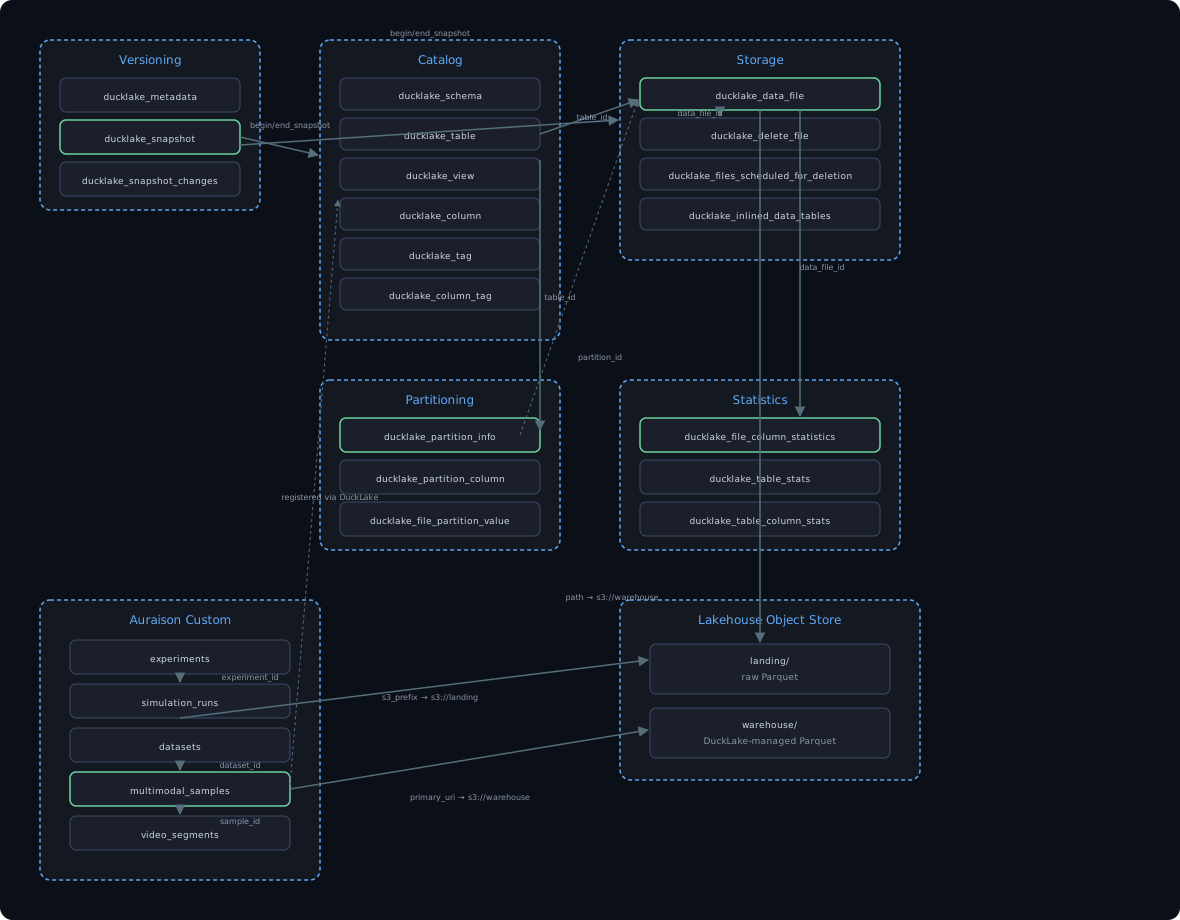
Editable Mermaid source: images/schema-architecture-overview.mermaid.md
DuckLake System Tables
Entity Relationships — Core Spine
The diagram covers the nine tables that form the read/write critical path: snapshot versioning, the table/column catalog, and Parquet file tracking. The remaining eight tables (views, tags, partitioning, bulk statistics) are documented in the reference tables below.
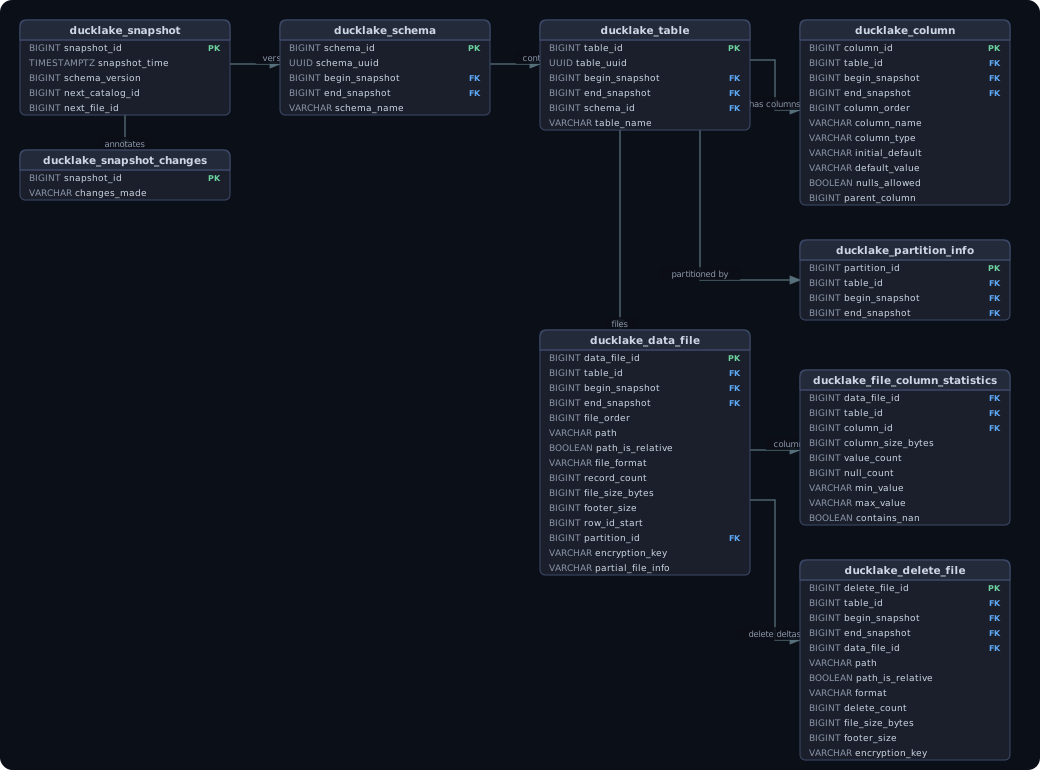
Editable Mermaid source: images/schema-ducklake-core-spine.mermaid.md
Reference — All DuckLake Tables
Versioning group
| Table | Purpose |
|---|---|
ducklake_metadata | Key/value store for extension-level settings (catalog format version, etc.) |
ducklake_snapshot | One row per write transaction; the snapshot_id is the time-travel handle |
ducklake_snapshot_changes | Human-readable description of what each snapshot changed |
Catalog group
| Table | Purpose |
|---|---|
ducklake_schema | Named schemas (namespaces); each row is live between begin_snapshot and end_snapshot |
ducklake_table | Registered tables; versioned the same way as schemas |
ducklake_view | Stored SQL views with dialect and optional column aliases |
ducklake_column | Per-column metadata including type, ordering, nullability, and default values |
ducklake_tag | Arbitrary key/value tags on any catalog object (table, schema, etc.) |
ducklake_column_tag | Key/value tags scoped to a specific column within a table |
Storage group
| Table | Purpose |
|---|---|
ducklake_data_file | One row per Parquet file; tracks path, format, record count, byte size, and which snapshot added it |
ducklake_delete_file | Positional or equality delete files recording which rows have been logically deleted |
ducklake_files_scheduled_for_deletion | Files that have been superseded and will be physically removed by the next VACUUM |
ducklake_inlined_data_tables | Tiny tables stored directly in PostgreSQL (no Parquet file) up to a configurable row threshold |
Partitioning group
| Table | Purpose |
|---|---|
ducklake_partition_info | Declares that a table is partitioned; versioned like schema/table |
ducklake_partition_column | Maps partition key indices to column IDs and transform expressions (identity, year, bucket, etc.) |
ducklake_file_partition_value | Per-file partition value enabling partition pruning without scanning file footers |
Statistics group
| Table | Purpose |
|---|---|
ducklake_file_column_statistics | Per-file, per-column min/max/null/nan counts — fed into DuckDB's predicate pushdown |
ducklake_table_stats | Table-level aggregate: total record count, next row ID, total byte size |
ducklake_table_column_stats | Table-level per-column null/nan flags and global min/max (used for query planning) |
Auraison Custom Tables
Four tables are created automatically by LakehouseCatalog._init_schema() on every catalog open.
Two are for experiment tracking (experiments, simulation_runs); two form the
generic data layer (datasets, multimodal_samples) that accommodates any modality —
image-text, audio-text, video-text, or sensor data — without schema changes.
Design rationale
A dataset-specific table (e.g. a coco_caption table with columns cocoid, sentences, sentids)
would require a new schema for every new dataset.
Instead, multimodal_samples normalises the universal fields
(sample_id, split, primary_uri, captions) and stores dataset-specific fields
(image filename, bounding boxes, audio duration, ROS bag metadata, …) in a metadata JSON column.
Entity Relationships
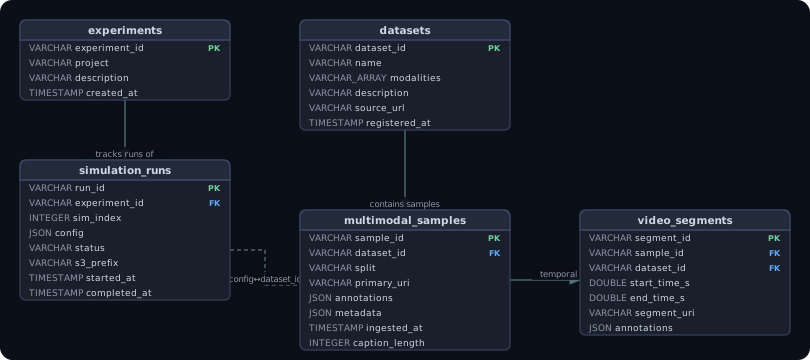
Editable Mermaid source: images/schema-custom-tables.mermaid.md
The dashed link between simulation_runs and multimodal_samples is logical, not a FK:
simulation_runs.config->>'dataset_id' equals multimodal_samples.dataset_id, enabling
the cross-plane join in use case 3 without any ETL:
SELECT d.name AS dataset, r.config->>'split' AS split, COUNT(s.sample_id) AS images
FROM simulation_runs r
JOIN datasets d ON d.dataset_id = 'yerevann/coco-karpathy'
JOIN multimodal_samples s
  ON s.dataset_id = 'yerevann/coco-karpathy'
 AND s.split = r.config->>'split'
GROUP BY 1, 2;
Column Reference
datasets
| Column | Type | Notes |
|---|---|---|
dataset_id | VARCHAR PK | Stable identifier, e.g. 'yerevann/coco-karpathy', 'librispeech/clean' |
name | VARCHAR | Human-readable name |
modalities | VARCHAR[] | e.g. ['image', 'text'], ['audio', 'text'], ['video', 'text'] |
description | VARCHAR | Free-text |
source_url | VARCHAR | HF Hub URL, paper URL, or internal link |
registered_at | TIMESTAMP | UTC |
multimodal_samples
| Column | Type | Notes |
|---|---|---|
sample_id | VARCHAR PK | Dataset-native ID cast to string (e.g. COCO cocoid, LibriSpeech utterance ID) |
dataset_id | VARCHAR FK | References datasets.dataset_id |
split | VARCHAR | train | val | test | restval | … |
primary_uri | VARCHAR | S3 or HTTPS path to the primary asset (image, audio file, video clip) |
annotations | JSON | Task-specific payload — see examples below |
metadata | JSON | Asset-level fields (filename, resolution, fps, sensor config, …) |
ingested_at | TIMESTAMP | UTC timestamp of ingest |
caption_length | INTEGER | len(annotations->>'captions'->0) — added via ALTER TABLE (schema evolution demo) |
annotations carries whatever the task requires, with no schema change needed per dataset:
| Task type | annotations shape | Example dataset |
|---|---|---|
| Image captioning | \{"captions": ["...", "..."], "num_captions": 5\} | COCO-Caption, CC3M |
| Image classification | \{"labels": ["cat"], "label_ids": [3]\} | ImageNet, CIFAR |
| Object detection | \{"boxes": [[x,y,w,h], …], "labels": ["car", …]\} | COCO-Detection, LVIS |
| VQA | \{"question": "…", "answers": ["…", "…"]\} | VQAv2, GQA |
| ASR / audio-text | \{"transcript": "…", "language": "en"\} | LibriSpeech, CommonVoice |
| ROS2 / sensor (planned) | \{"topics": ["/camera/image", "/imu/data"], "hz": 30\} | rosbag episodes |
COCO-Caption → multimodal_samples mapping
| COCO parquet column | maps to | Notes |
|---|---|---|
cocoid | sample_id | Cast to VARCHAR |
url | primary_uri | Original COCO image URL |
sentences | annotations.captions | All 5 reference captions |
split | split | Unchanged |
filename, imgid, filepath | metadata JSON | Asset-level; carried without schema lock-in |
sentids | (dropped) | Internal HF annotation IDs; not needed downstream |
experiments
| Column | Type | Notes |
|---|---|---|
experiment_id | VARCHAR PK | UUID string assigned at registration |
project | VARCHAR | Short slug, e.g. coco-caption-nb |
description | VARCHAR | Free-text description of the experiment |
created_at | TIMESTAMP | UTC timestamp at registration |
simulation_runs
| Column | Type | Notes |
|---|---|---|
run_id | VARCHAR PK | UUID string |
experiment_id | VARCHAR FK | References experiments.experiment_id |
sim_index | INTEGER | Zero-based index within the experiment |
config | JSON | Arbitrary run config (split, max_samples, dataset_id, tier, …) |
status | VARCHAR | started | completed | failed |
s3_prefix | VARCHAR | Lakehouse path prefix of the run's raw input data |
started_at | TIMESTAMP | UTC |
completed_at | TIMESTAMP | UTC; NULL while in progress |
How the Two Layers Interact
Every write to an Auraison custom table (INSERT, ALTER, UPDATE) creates a new
ducklake_snapshot row and is reflected in ducklake_table, ducklake_column,
and ducklake_data_file.
This is what enables time-travel queries against all four tables using AT (VERSION => N).
Write path:
  Python (LakehouseCatalog / DuckDB)
    → ducklake_snapshot          (new snapshot_id)
    → ducklake_table / column    (catalog update, if DDL)
    → ducklake_data_file         (new Parquet file written to s3://warehouse)
    → ducklake_file_column_stats (min/max/null stats for predicate pushdown)

Read path (time travel):
  SELECT * FROM multimodal_samples AT (VERSION => 1)
    → DuckLake resolves snapshot_id = 1
    → reads ducklake_data_file WHERE begin_snapshot <= 1 AND end_snapshot IS NULL
    → fetches those Parquet files from the lakehouse
HF Video Datasets and video_segments
What works out of the box
HF video datasets come in two forms:
| Form | How stored in Parquet | Ingestion behaviour |
|---|---|---|
| URL-based (large datasets — Kinetics, MSR-VTT) | struct<bytes: null, path: "https://..."> | sync_from_hf converts the struct to a plain URL string; that URL becomes primary_uri ✓ |
| Bytes-embedded (small datasets) | struct<bytes: binary, path: "video.mp4"> | sync_from_hf extracts each video to s3://landing/{prefix}/assets/video/{name}.mp4; the S3 URI becomes primary_uri ✓ |
The same logic applies to Image and Audio feature columns — sync_from_hf detects any struct<bytes, path> column and handles it identically regardless of modality.
After ingestion, the Parquet file stored in the lakehouse contains plain URI strings instead of binary blobs, so DuckDB and the streaming layer can query metadata without downloading assets.
Video-level tasks (video captioning, action recognition, VQA)
One video → one multimodal_samples row.
annotations carries task-specific payloads; metadata carries video properties.
// MSR-VTT (video captioning)
{ "annotations": {"captions": ["A man plays guitar", "..."], "num_captions": 20},
  "metadata":    {"duration_s": 15.2, "fps": 30, "width": 320, "height": 240} }

// Kinetics-700 (action recognition)
{ "annotations": {"label": "playing guitar", "label_id": 289},
  "metadata":    {"duration_s": 10.0, "fps": 25, "start_s": 30.0, "end_s": 40.0} }

// MSRVTT-QA (video question answering)
{ "annotations": {"question": "What is the man doing?", "answer": "playing guitar"},
  "metadata":    {"duration_s": 15.2, "fps": 30} }
Temporal / dense annotations — video_segments
Datasets like ActivityNet Dense Captions, YouCook2, or AVA associate
multiple timestamped annotations with a single video.
These cannot be efficiently stored or queried as a flat JSON array in one row.
video_segments is created automatically by LakehouseCatalog._init_schema():
CREATE TABLE IF NOT EXISTS video_segments (
    segment_id   VARCHAR NOT NULL,   -- UUID
    sample_id    VARCHAR NOT NULL,   -- FK → multimodal_samples.sample_id
    dataset_id   VARCHAR NOT NULL,   -- FK → datasets.dataset_id
    start_time_s DOUBLE,             -- segment start in seconds
    end_time_s   DOUBLE,             -- segment end in seconds
    segment_uri  VARCHAR,            -- S3 path to extracted clip (optional)
    annotations  JSON,               -- per-segment label, caption, bbox, etc.
    metadata     JSON                -- resolution, codec, frame count, etc.
);
ActivityNet Dense Captions example — one row in multimodal_samples, many in video_segments:
-- multimodal_samples row (video level)
INSERT INTO multimodal_samples VALUES (
    'v_abc123', 'activitynet/v1-3', 'train',
    's3://landing/activitynet/v_abc123.mp4',
    json_object('num_segments', 7),
    json_object('duration_s', 180.0, 'fps', 29.97),
    now()
);

-- video_segments rows (one per temporal annotation)
INSERT INTO video_segments VALUES
    (gen_random_uuid(), 'v_abc123', 'activitynet/v1-3',  0.0,   5.2, NULL,
     json_object('caption', 'A person walks into the room'), NULL),
    (gen_random_uuid(), 'v_abc123', 'activitynet/v1-3',  5.2,  12.4, NULL,
     json_object('caption', 'They pick up a ball and throw it'), NULL),
    ...;
Cross-table query — dense captions for one video:
SELECT s.start_time_s, s.end_time_s, s.annotations->>'caption' AS caption
FROM video_segments s
JOIN multimodal_samples m ON m.sample_id = s.sample_id
WHERE m.dataset_id = 'activitynet/v1-3'
  AND m.sample_id  = 'v_abc123'
ORDER BY s.start_time_s;
Future: ROS 2 Bags and Sensor Data
ROS 2 bags map to multimodal_samples at the episode level and reuse
video_segments for per-topic frame-level access — the same table covers both:
// multimodal_samples for a ROS 2 bag episode
{ "primary_uri": "s3://landing/turtlebot/episode_042.db3",
  "annotations": {"topics": ["/camera/image_raw", "/imu/data", "/lidar/points"],
                  "msg_types": ["sensor_msgs/Image", "sensor_msgs/Imu", "sensor_msgs/PointCloud2"]},
  "metadata":    {"robot": "turtlebot4", "duration_s": 120.4,
                  "hz": {"camera": 30, "imu": 200, "lidar": 10}} }

// video_segments row for one extracted camera frame
{ "start_time_s": 1678000000.123, "end_time_s": 1678000000.156,
  "segment_uri":  "s3://landing/turtlebot/episode_042/camera/frame_00042.jpg",
  "annotations":  {"detections": [{"label": "wall", "bbox": [0, 0, 640, 120]}]},
  "metadata":     {"topic": "/camera/image_raw", "seq": 42, "encoding": "rgb8"} }
References
- Hoyt Emerson, "Understanding DuckLake's Metadata Tables", The Full Data Stack, 27 Dec 2025. https://thefulldatastack.substack.com/p/understanding-ducklakes-metadata